Map any relational database to an i3X context model. Visual schema explorer, auto-mapping, and a built-in REST API.

Connect to MTConnect MQTT brokers and transform device data into i3X context models with live values and a REST API.
Companion Spec v0.0.2

Load CSV and Excel files, auto-detect cross-file relationships, and serve an i3X-compliant REST API. No database required.

Merge multiple i3X servers into one unified endpoint. Concurrent fan-out, graceful degradation, and a single API surface.

Visualize the entire i3X object graph as an interactive canvas. Explore nodes, relationships, and live values.

Connect to any i3X server, browse the object hierarchy, and build live dashboards with real-time value tiles.

MCP server for AI agents. Browse objects, read live values, search with BM25, traverse the graph, and analyze the full i3X model.

Bridge OPC-UA address spaces to i3X context models. Subscribe to live node values and serve them through a REST API.

Cross-platform desktop client for browsing and monitoring any i3X-compliant API server. By ACE Technologies.
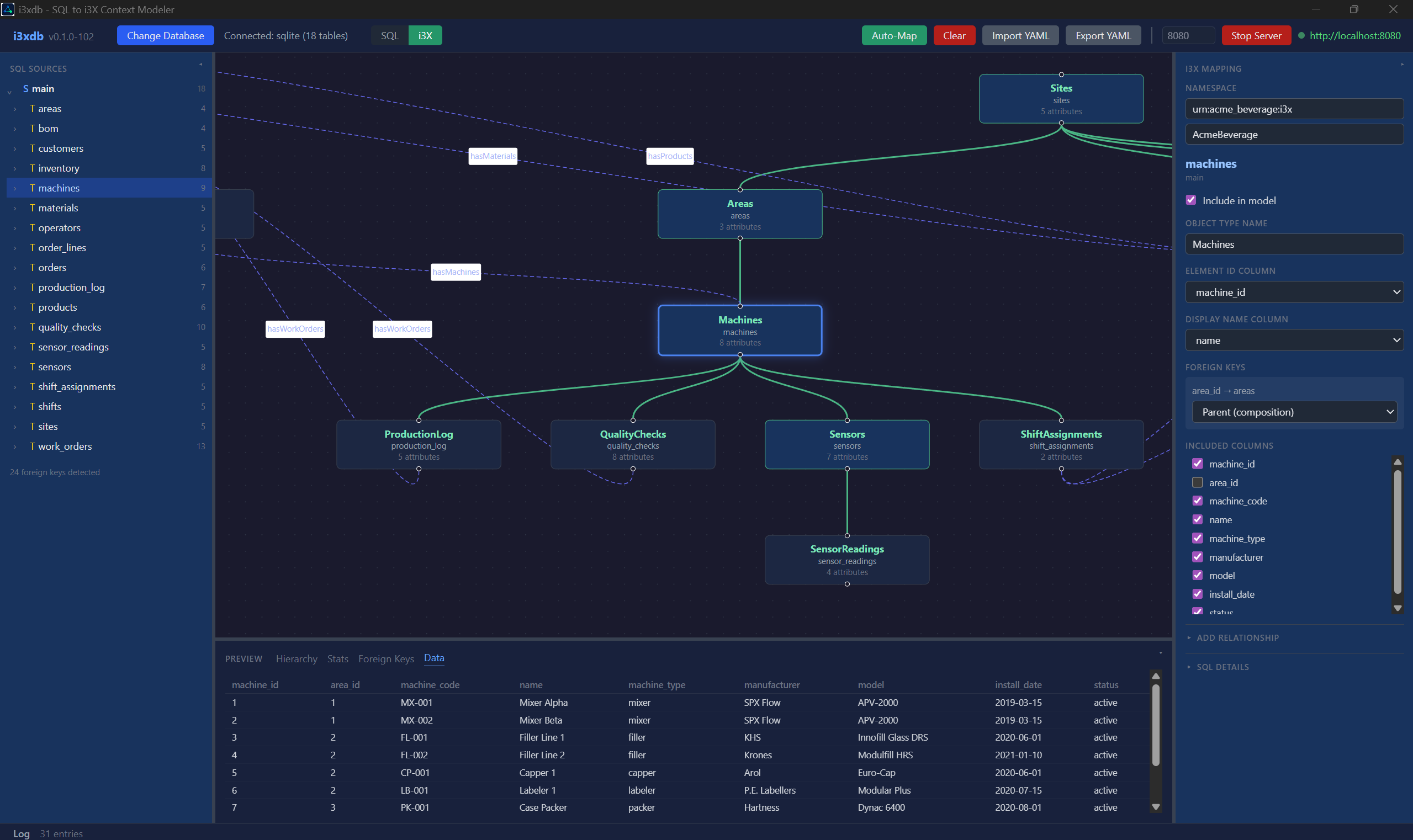
Connect to any SQL database. Auto-generate an i3X context model. Serve a standards-compliant REST API. No middleware, no ETL, no custom code.

i3xdb connected to a manufacturing database — i3X composition view with live server
From schema discovery to a running API, without writing a line of code.
Discovers tables, columns, primary keys, and foreign key relationships using native database catalogs.
Dual-view canvas toggles between SQL schema and i3X composition tree. Drag, zoom, and explore.
Detects parent relationships, names types, selects display columns, and classifies foreign keys automatically.
Export your mapping as YAML for version control. Re-import with live validation against any connected schema.
Define custom relationships between tables that lack physical constraints. Fully supported in UI and export.
Deploy the i3X API standalone via CLI. Load YAML config, set a port, and run in Docker or CI pipelines.

Database to API in minutes.
Enter a connection string. i3xdb introspects every table, column, key, and relationship.
Use auto-mapping or the visual designer to define object types, composition, and relationships.
Start the embedded server. Your database is now a fully compliant i3X REST API with Swagger docs.
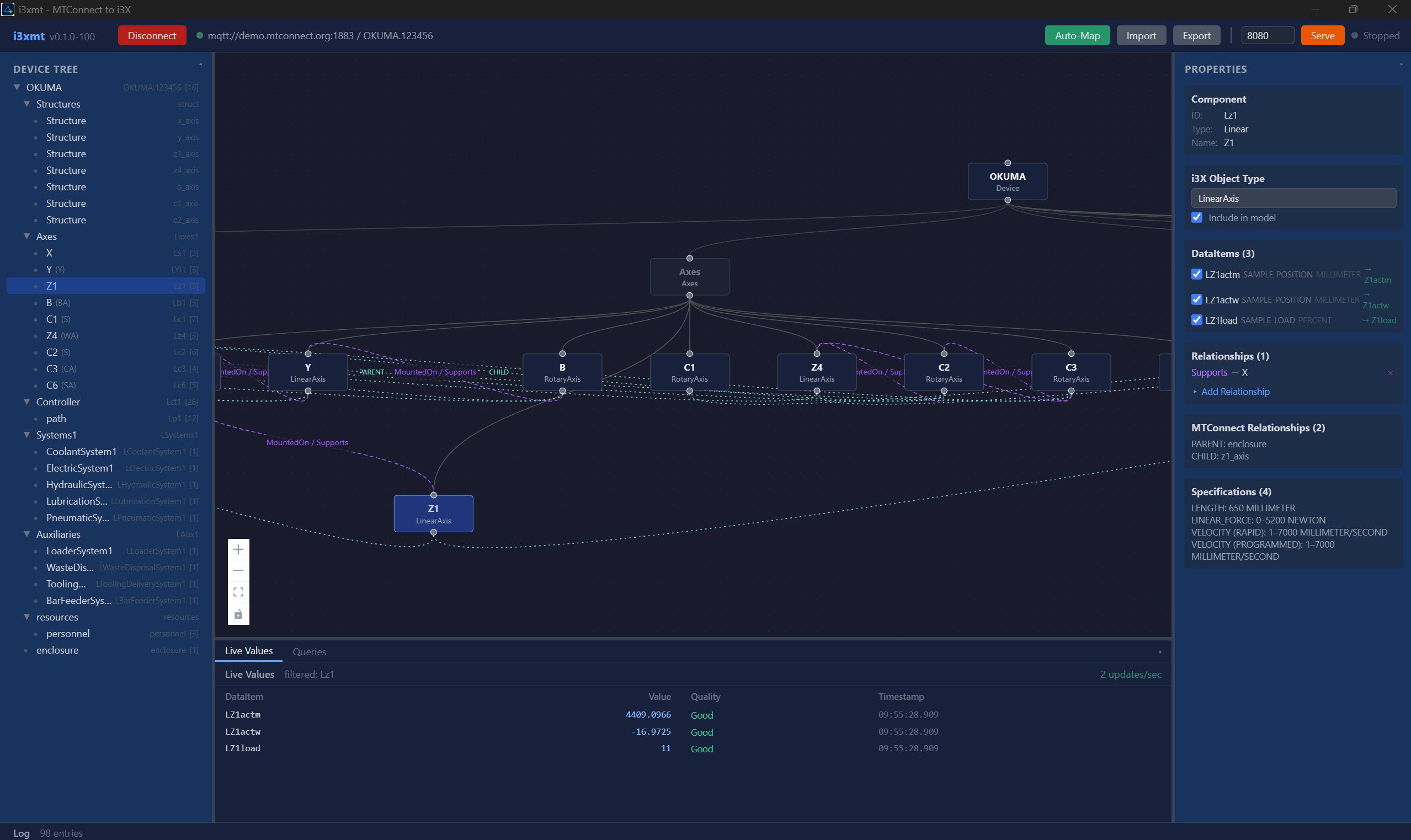
Connect to an MQTT broker. Receive MTConnect device data in real time. Auto-generate an i3X context model. Serve a standards-compliant REST API.

i3xmt connected to an MTConnect MQTT broker — device model with live i3X server
From device discovery to a running API, without writing a line of code.
Connects to an MQTT broker and subscribes to MTConnect Probe messages to discover components, data items, and specifications.
Interactive graph canvas displays the MTConnect component hierarchy as an i3X composition tree. Drag, zoom, and explore.
Maps components to i3X object types, names properties from data items, and builds composition relationships automatically.
Export your mapping as YAML for version control. Re-import to restore the device model and mapping without reconnecting.
Real-time observation table shows current values, quality, and timestamps from MTConnect Current and Sample streams.
Deploy the i3X API standalone via CLI. Load YAML config, set a port, and run in Docker or CI pipelines.

Machine data to API in minutes.
Enter a broker URL and device UUID. i3xmt subscribes to MQTT and discovers every component, axis, and data item.
Use auto-mapping or the visual designer to define object types, composition, and relationships.
Start the embedded server. Your machine data is now a fully compliant i3X REST API with live values and Swagger docs.
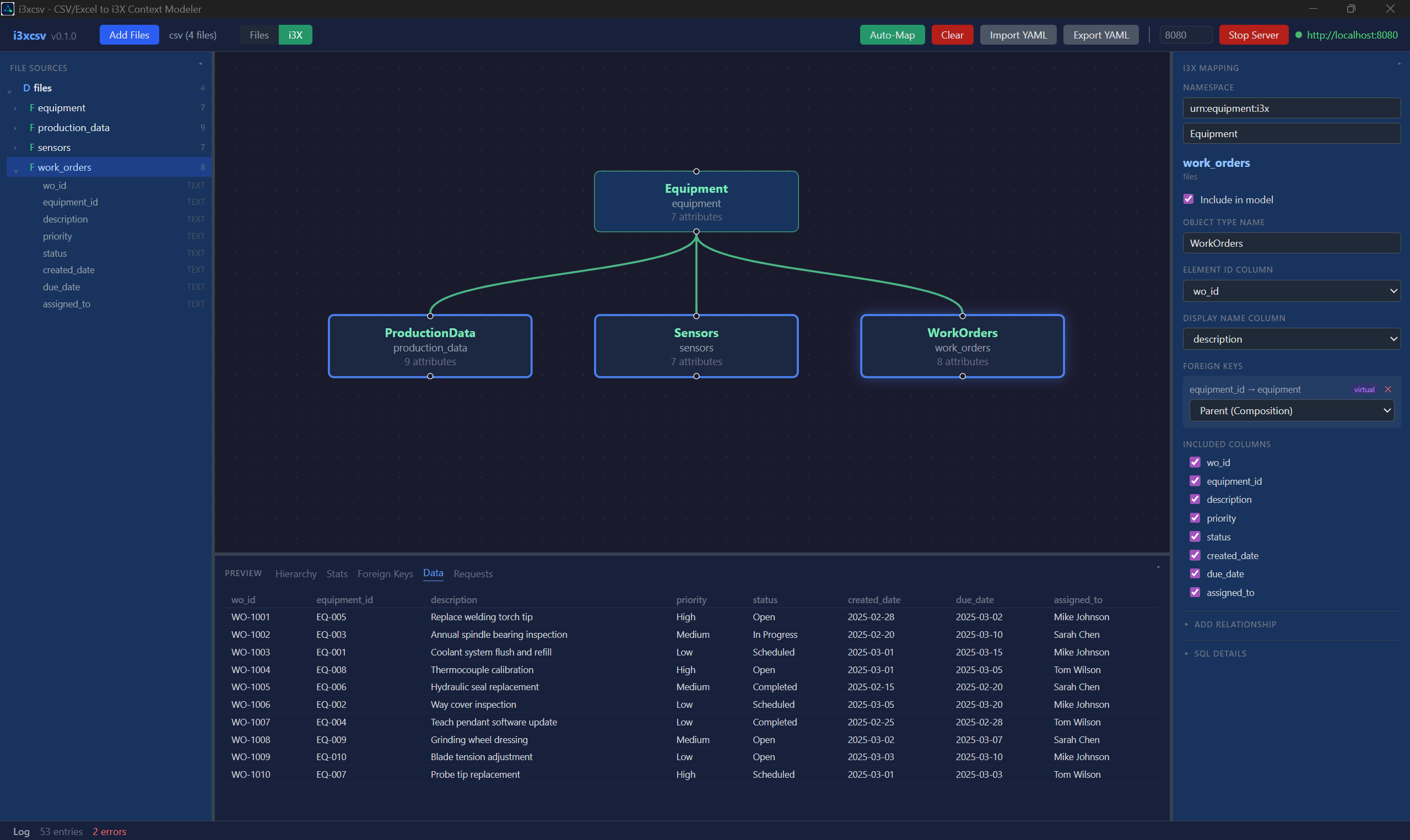
Load CSV and Excel files. Auto-detect cross-file relationships. Serve a standards-compliant REST API. No database, no middleware, no code.

i3xcsv with equipment CSV and Excel files — i3X composition view with live server
From flat files to a running API, without writing a line of code.
Load any combination of CSV and Excel files. Columns and types are inferred automatically from your data.
Dual-view canvas toggles between file schema and i3X composition tree. Drag, zoom, and explore.
Detects cross-file relationships by matching ID columns, names types, and classifies foreign keys automatically.
Export your mapping as YAML for version control. File paths are embedded so the headless server can reload data.
Define cross-file relationships that don't exist in the source data. Link any column to any file.
Built-in diagnostics panel shows every API request and response body in real time. Debug your model instantly.

Flat files to API in minutes.
Select your CSV and Excel files. i3xcsv parses every row and infers column types automatically.
Auto-map detects cross-file relationships. Refine with the visual designer to define composition and hierarchy.
Start the embedded server. Your files are now a fully compliant i3X REST API with Swagger docs.
Aggregate multiple i3X data sources into a single standards-compliant REST API. Fan out requests concurrently, merge results, and present one seamless interface.
i3xag-server aggregating three upstream i3X servers — health check showing all services available
Multiple i3X servers behind one endpoint. No code changes to your clients.
Every request is dispatched to all upstream servers in parallel. Results are merged and returned as a single response.
If one upstream is down, the aggregator returns partial results from the remaining servers. Failed upstreams are logged and skipped.
Identical routes to any i3X server. Clients connect to the aggregator without modification.
Built-in /health endpoint checks each upstream and reports Healthy, Degraded, or Unhealthy status.
Define your port and upstream list in a simple YAML file. Or pass everything via CLI flags.
Circular buffer of recent requests with timing, status codes, and response previews at /_diagnostics/requests.

Multiple servers to one endpoint in minutes.
List your upstream i3X servers in a YAML file or pass them as CLI arguments.
Run i3xag-server. It connects to all upstreams, verifies health, and begins listening.
Point any client to the aggregator. Objects, types, relationships, and values from all upstreams appear as one.
port: 9000 upstreams: - name: "SCADA" url: "http://localhost:8080" - name: "ERP" url: "http://localhost:8081"
# No config file needed i3xag-server \ --port 9000 \ --upstream "SCADA=http://localhost:8080" \ --upstream "ERP=http://localhost:8081"
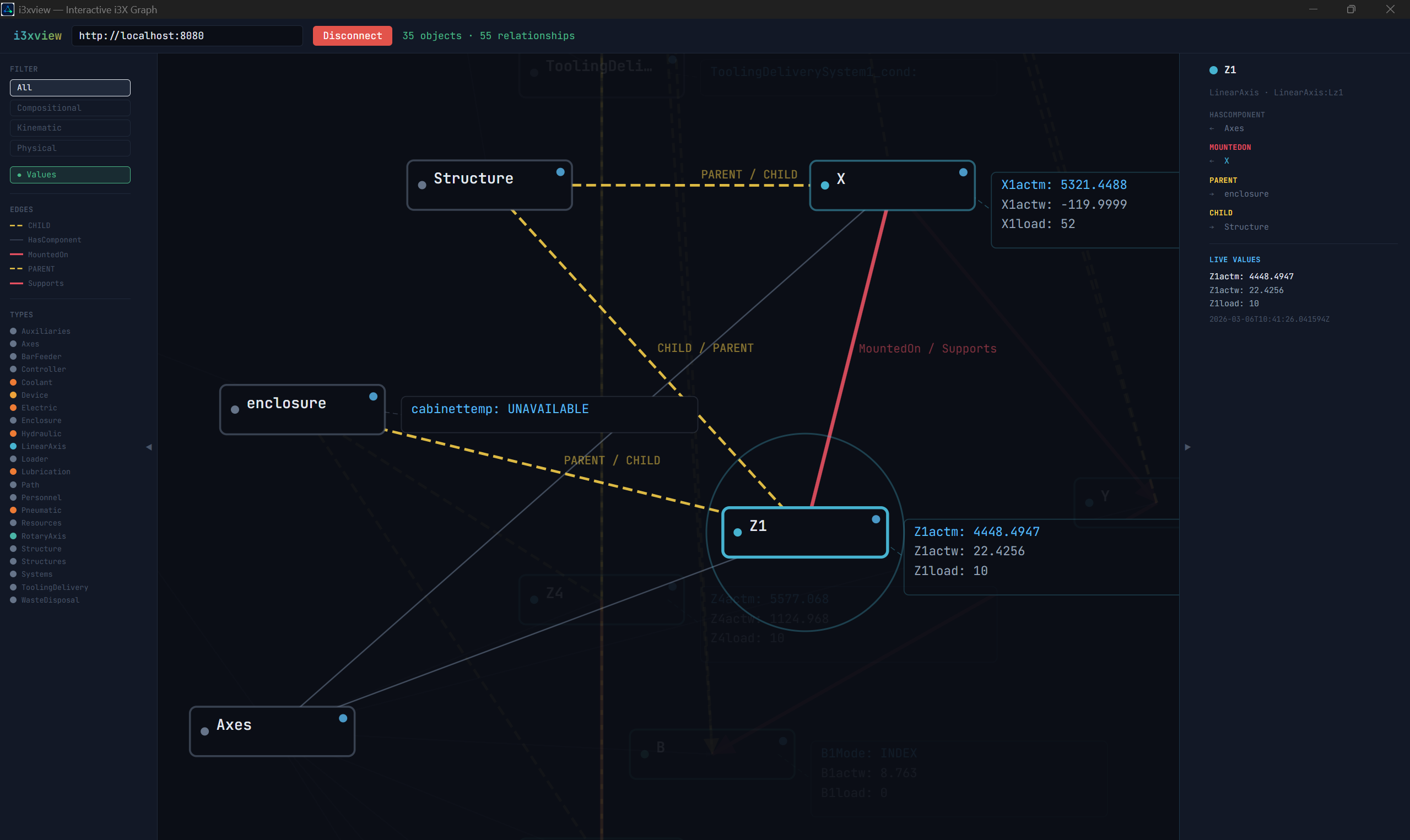
Connect to any i3X server and visualize the entire object model as a navigable node graph. Explore compositions, relationships, and live values with pan, zoom, and hover-driven detail panels.

i3xview connected to an i3X server — interactive object graph with live values
From connection to interactive graph in seconds.
Pan, zoom, and drag nodes across a full-screen graph canvas. Click any node to inspect its properties and relationships.
Parent-child relationships render as a hierarchical tree layout. See the full object structure at a glance.
Non-compositional relationships display as colored, labeled edges. Inverse pairs are deduplicated automatically.
Nodes with values show real-time data on hover. Quality and timestamp are displayed alongside each value.
Runs as a static webapp (any browser) or a native desktop app (Tauri). Same codebase, automatic environment detection.
Enter a server URL, click Connect. No setup, no install for the web version. Works with any i3X-compliant server.

Server to graph in seconds.
Enter an i3X server URL. i3xview fetches all objects, relationships, and values.
Pan and zoom the graph. Click nodes to see details. Hover for live values. Drag to rearrange.
See compositions, relationships, and values in context. Navigate the full model without reading raw JSON.
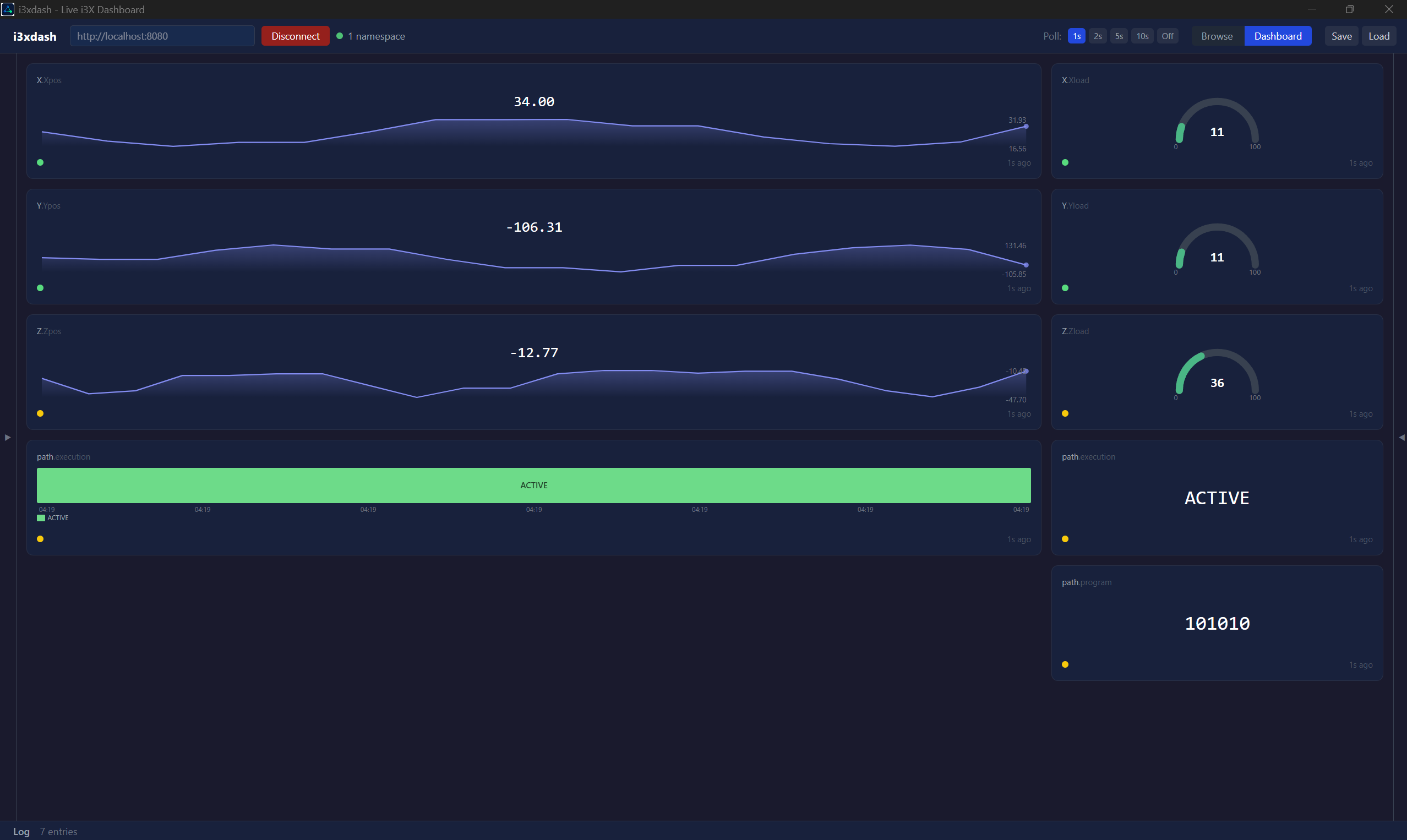
Connect to any i3X server, browse the full object hierarchy, and build real-time dashboards with configurable tiles. Values, gauges, sparklines, and state timelines — all updating live.

i3xdash connected to an i3X server — live dashboard with value, gauge, sparkline, and timeline tiles
From object browser to live dashboard in seconds.
Navigate the full i3X hierarchy — namespaces, object types, and instances. Filter and search across the entire model.
Select any object to see its current value, quality, and timestamp. Multi-property objects display all fields in a table.
Value tiles for single numbers, gauges for ranges, sparklines for trends, and state timelines for discrete state tracking.
Drag tiles to any grid position. Resize by pulling edges or corners. Overlap detection prevents layout conflicts.
Configure units, decimal precision, thresholds, colors, Y-axis ranges, and more. Each tile type has its own settings.
Persist dashboard layouts to JSON. Reload and continue where you left off. Full backward compatibility.

From connection to live dashboard in minutes.
Enter an i3X server URL. i3xdash loads the full object model and begins polling for live values.
Explore namespaces, types, and objects. Select any object to see its live value, quality, and related objects.
Pin values as tiles. Choose value, gauge, sparkline, or timeline. Drag, resize, and configure each tile individually.
Crawl an i3X server, build a BM25 search index and an in-memory graph database, and let AI agents search, traverse, and analyze the entire object model. RAG + Graph + MCP in one package.
i3xrag running as an MCP server — agent connects, indexes, searches, and traverses the object graph
Let AI agents find objects by meaning and explore them by structure.
BM25 text search finds objects by meaning. Graph traversal follows connections. Combined mode does both in one call — search, then auto-traverse each result.
Every object, composition, and relationship stored as a traversable graph. Walk edges, find shortest paths, explore neighborhoods, get full composition trees.
Filter objects by quality (Good/Bad), numeric range, or missing values. Find stale data older than N seconds. Retrieve historical value series with time range filters.
Relationship map shows how types connect at a schema level. Type schema reveals child patterns, relationship usage, and value quality distribution per type.
Composition trees, ancestor chains, subtree summaries, and aggregation by type or parent. Understand hierarchy without browsing object by object.
One crawl builds both the BM25 search index and the graph database. No extra configuration, no separate infrastructure. 19 MCP tools from one connection.

From i3X API to searchable knowledge base in seconds.
Add i3xrag to your MCP client config. Point it at the executable path.
The AI agent calls connect_and_index with a server URL. i3xrag crawls the full model and builds a BM25 search index and graph database.
Search by meaning, traverse by structure, filter by value, analyze by type. 19 MCP tools for any question about the model.
{
"mcpServers": {
"i3xrag": {
"command": "C:/path/to/i3xrag.exe"
}
}
}
{
"mcpServers": {
"i3xrag": {
"command": "C:/path/to/i3xrag.exe"
}
}
}
All i3X tools, servers, and utilities.
SQL to i3X Context Modeler — visual mapping, auto-mapping, built-in REST API
MTConnect MQTT to i3X — device discovery, live values, visual designer
CSV/Excel to i3X — multi-file loading, smart auto-map, virtual foreign keys
Interactive graph viewer — visualize i3X object models as a navigable node graph
Live dashboard — browse object hierarchies and build real-time value tiles
OPC-UA to i3X — bridge OPC-UA address spaces to i3X context models
Headless i3X API from any SQL database. YAML config, Docker-ready.
Headless MTConnect to i3X. Connect MQTT, serve REST API.
Headless flat file to i3X. YAML config with embedded file paths.
i3X Aggregator — merge multiple i3X servers into one endpoint.
Headless OPC-UA to i3X. Subscribe to live node values, serve REST API.
MCP Server — live queries, BM25 search, graph traversal, and analysis over i3X models.
Tell us a bit about yourself and we'll start the download.